Eos Lightmedia · R+D
A plain-text scene format for addressable lighting.
A plain-text file format, a small set of rules, and deterministic output. No cue lists, no timelines, no transport layer. What it doesn't do is left to the runtime.
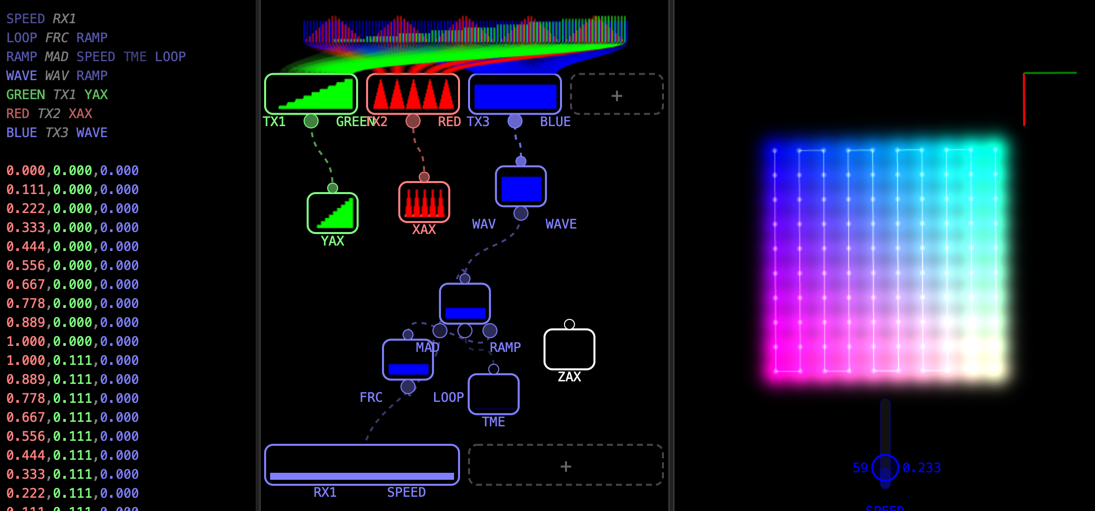
The runtime evaluates them per frame, per fixture, using the fixture's physical coordinates, frame timing, and any number of input signals. Because animations are tied to coordinates, the result is inherently spatial: a wave travels along whatever physical path the fixtures follow, regardless of the layout.
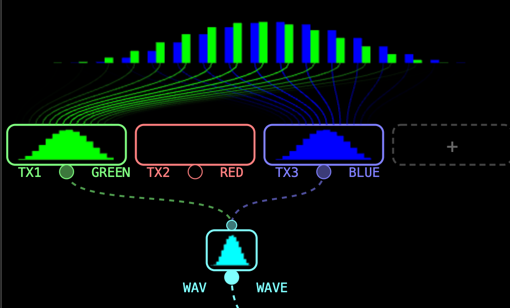
Coordinates as color, time as a pulse. An external input controls the speed.
RX01 SPEED # external speed control
MULT SCALED SPEED TIME # scale time by speed
MOVE TIMELINE TIMELINE SCALED # accumulate
LOOP PHASE TIMELINE # wrap to 0..1
WAVE PULSE PHASE # smooth sine pulse
TX01 RED XPOS # output red from X position
TX02 GREEN YPOS # output green from Y position
TX03 BLUE PULSE # output blue from pulse
Inputs feed operations, operations feed outputs.
1 · Inputs
Fixture positions (XPOS, YPOS, ZPOS), typically from a survey or layout file. Frame delta (TIME). Any number of external signals (RX01, RX02, …) for sliders, sensors, or upstream control. Two random sources: RAND (per frame) and SNOW (per fixture).
2 · Processing
Each line is an opcode, a name, and its parameters. Nodes reference other nodes by name — including themselves. Self-reference is a feedback loop: the core technique for accumulators, decays, and time-based animation without a timeline.
3 · Outputs
Any number of TX channels (TX01, TX02, …) per scene. Each TX binds a computed node to an output column. What those columns mean (RGB, RGBW, intensity, etc.) is up to the runtime and the fixtures it drives.
A minimal set of compute primitives and any number of input and output channels. Every scene is composed from this set.
No-code authoring for lighting designers. CNDL Maker lets you connect visual blocks like routing wires on a circuit board, though you can still edit the corresponding code if you prefer. Preview your scenes in real time against your actual installation by importing 3D layout files (.obj). Works on macOS, Windows, and Linux.
You already think in UV space, noise functions, and per-pixel compute. CNDL is that, but for physical fixtures instead of fragments. The operation set compiles directly to WGSL. Write it once, deploy to any target — GPU or microcontroller.
You know Pharos, Madrix, or DMX consoles. CNDL handles what those tools can't: scenes that run on-device without a PC, arbitrary 3D fixture layouts instead of 2D pixel maps, and files that travel with the installation — not the software license.
A compliant runtime is a short project in any language. Here are some of the places a .cndl file can run.
Microcontrollers
Parse the file on a small device, evaluate per frame, drive LEDs directly — no PC in the loop. The Eos Pixel Driver does this today on RP2040, outputting to addressable LEDs or DMX.
Single-board computers
Run the scene on a Linux board and stream output over Art-Net, sACN, or whatever protocol the install needs. More headroom than a microcontroller, same file.
Desktop & Web
The format is open. Integrate CNDL into TouchDesigner, Blender, Unreal Engine, or build your own runtime in C, C++, Python, Rust, JavaScript, Swift, Go — any language that can do arithmetic. CNDL Maker is ours.
GPU
The operation set maps directly to GPU compute. CNDL Maker already compiles scenes to WGSL. For large fixture counts, a GPU runtime handles what embedded hardware cannot.
If you can evaluate addition, multiplication, and a sine wave, you can run CNDL.